RocksDB: the SQLite of Storage Engines
Corrections to the video
The article below has these right. The video does not.
- medium "Ten times faster random writes and thirty percent faster random reads, on close to a petabyte of data inside Facebook" ties the benchmark to the petabyte. In the 2013 post, the petabyte is RocksDB's total usage across Facebook applications, not the benchmark dataset.
- medium "The RocksDB team measured ten to thirty in production" (and four to ten for tiered): the paper says leveled compaction "usually exhibits" 10 to 30 and tiered brings it "down to the 4 to 10 range". They are not presented as production measurements.
- low On screen, the write throttling commit is shown as part of the "committed from a Facebook machine" story. That commit came from a personal address. The commit with the Facebook hostname is a different one (cc6c325).
Scroll to the oldest commit with code in the RocksDB repository. It is from March 2011, it says Initial checkin., and it is not Facebook’s. It is LevelDB, a storage library from Google.
People call RocksDB too complex and treat its stalls, knobs and compaction styles as folklore. This article builds each one from the mechanism, and each turns out to be a price tag on one of the three costs of an LSM tree: write, read or space.
From Google’s library to Facebook’s fork
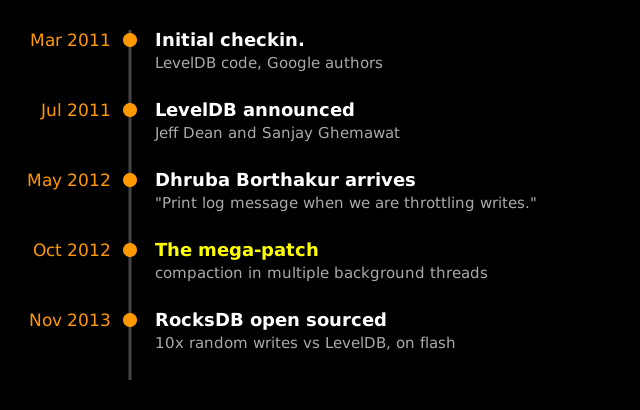
LevelDB was announced in July 2011 by Jeff Dean and Sanjay Ghemawat. A precursor of it stored every Bigtable tablet, and Chrome built IndexedDB on it. It is a library you link into your program, not a server you run. It was also small on purpose, about 30k lines of code, and all of its compaction ran on one background thread.
In May 2012 a new name shows up: Dhruba Borthakur, committing from a Facebook machine. Three weeks in, one of his commits reads Print log message when we are throttling writes. In October 2012 he landed a much bigger change, and the commit title does not undersell it: “This is the mega-patch multi-threaded compaction”. Its body says it “allows compaction to occur in multiple background threads concurrently.”
What a write stall is
Every flush adds a file to level zero, and only compaction takes files away. When files pile up faster than compaction can merge them, the engine slows incoming writes on purpose, “to the speed that the database can handle”, because otherwise space and read amplification keep growing. Let enough pile up, and writes stop completely.
Why level zero is counted at all
Below level zero, each level is cut into files whose key ranges do not overlap. Level zero is different: each flushed file covers whatever keys the MemTable held, which for random keys is almost the whole key range. So, per the Tuning Guide, “Point lookups must consult all files in level 0 and at most one file from each other levels.” Bloom filters make that cheap for point lookups, but not for range scans, where “the read amplification is number_of_level0_files + number_of_non_empty_levels”.
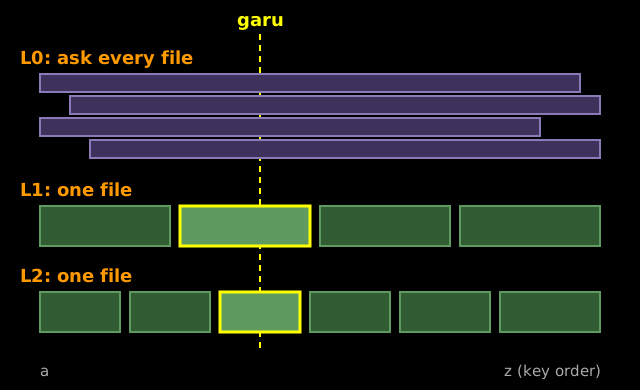
So the level zero file count is really a cap on read cost.
The three gauges
RocksDB watches three things, in GetWriteStallConditionAndCause:
- Memtables waiting to flush. Writes stop when their number reaches
max_write_buffer_number(default 2). - Level zero files. Slow and stop triggers, compared below.
- Bytes waiting for compaction. A soft limit slows writes and a hard limit stops them, 64 GB and 256 GB by default.
All of those defaults are in advanced_options.h. For level zero, the line moved between the two engines. LevelDB slows writes at 8 files and stops them at 12. RocksDB defaults to 20 and 36.
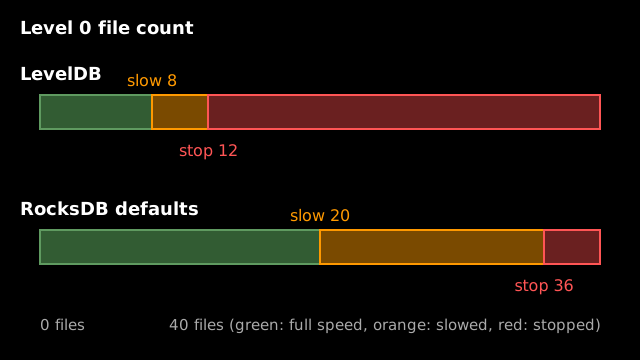
Engineers call this a write stall. Averages hide it, because most writes are still fast; it shows up in the slowest one percent. Facebook’s own measurements of LevelDB found “frequent write-stalls with LevelDB that caused significant 99-percentile latency”.
Why Facebook forked it
Facebook had the stalls, and new hardware. Borthakur’s history of RocksDB says the data set “migrated from spinning disks to flash”, where a read or write drops from about 10 milliseconds to about 100 microseconds. At that speed the network trip to a database server stops being free: “Network data access is 50% higher overhead than local data access”. So the engine had to be embedded.
LevelDB was already embedded, but “Leveldb’s single-threaded compaction process was insufficient to drive server workloads.” So: “The best path was to fork the leveldb code and change its architecture to suit these needs. So, RocksDB was born!” The team’s FAST ’21 paper dates it to 2012.
The mega-patch was the heart of that change: more compaction threads, so level zero could drain faster. In November 2013 Facebook open-sourced RocksDB. On flash it reported random writes “10 times faster” and random reads “30% faster” than LevelDB, with close to a petabyte of data already in RocksDB inside Facebook.
Write amplification you can compute
More threads only help while the drive has room, because compaction writes every byte again, more than once. That multiple is write amplification, and the Tuning Guide works it out for the default leveled style.
Follow one byte. It is written once when the MemTable flushes to level zero (the guide leaves out the write-ahead log). Level one is sized like level zero, so merging into it costs 2. Each level below is ten times bigger, so pushing a file down rewrites about ten times its size in overlapping files. The guide’s 500 GB example has L1 to L4, so that happens three times.
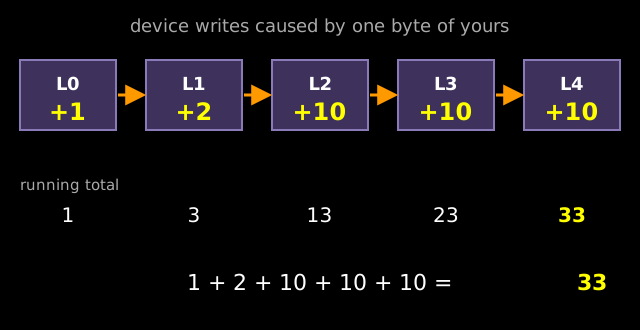
The guide’s words: “Total write amplification is therefore approximately 1 + 2 + 10 + 10 + 10 = 33”. The FAST paper says leveled RocksDB “usually exhibits write amplification between 10 and 30”, which it calls “too high for write-heavy applications”.
Compaction debt
Here is what 33 does to a drive (our illustration): 30 MB/s of user writes becomes about 1 GB/s of compaction writes, plus nearly as much reading. Past what the drive sustains, the unfinished work piles up as debt until a gauge fires. Like messages you owe a reply: the pile grows until someone calls to ask what is wrong. Compaction debt is the pile, and the stall is the call.
Why it has so many knobs
The speed came with a price: a lot of options. The paper says it was deliberate: “we introduced many new knobs, and introduced the support of pluggable components, all to allow applications to realize their performance potential”, and it “proved to be a successful strategy for gaining initial traction early on.”
The code grew with it. In 2020 Cockroach Labs counted more than 350k lines of RocksDB, against LevelDB’s original 30k. The options grew too, by our count of data members in the public option structs: 13 in LevelDB, 44 in RocksDB at the end of 2012, 161 at the end of 2020, 212 in September 2026. Every database persists its settings to an options file, and the example file in the repository is 141 lines long.
The Tuning Guide is candid about the result:
Unfortunately, configuring RocksDB optimally is not trivial. Even we as RocksDB developers don’t fully understand the effect of each configuration change.
The paper names the real problem: the best configuration depends “also on the workload generated by the applications above them”. Across 39 ZippyDB deployments it found “over 25 distinct configurations”. And inside somebody else’s database, “The third party will typically know very little about RocksDB and how it is best tuned.”
Column families: several trees, one WAL
Most knobs are set per column family. One RocksDB database can hold several LSM trees, each with its own MemTable, files and options. They share one write-ahead log, so a write across families is atomic.
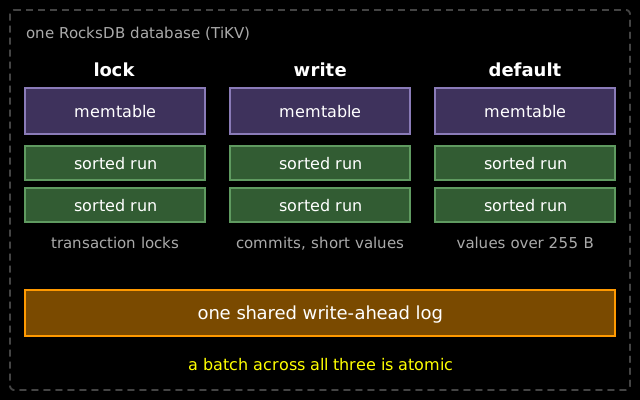
In TiKV, the RocksDB overview lists a lock family for transaction locks, a write family for written data and commit metadata, and a default family for “data longer than 255 bytes”, and the TiKV source configures each in its own section. (It also keeps a raft family, left off the picture.)
Pricing the compaction style
The biggest knob is the compaction style. RocksDB defaults to leveled, the 33 above. Universal compaction, RocksDB’s name for tiered, flips the trade: it lets sorted runs of similar size pile up and merges them together, so a byte is rewritten only when its run is merged. The paper says tiered “brings write amplification down to the 4-10 range, although with lower read performance”. (The RUM conjecture explains the taxonomy of styles; here we only price it.)
Reads pay because a universal lookup may check every sorted run, not one file per level. Space pays too: during a full universal merge “both of input files and the output file need to be kept, so the DB will be temporarily double the disk space usage.”
Space became the target
The team later found that “for most applications, space utilization was far more important than write amplification”. Leveled compaction has a quiet problem with space amplification (bytes on disk over live data). An update does not overwrite the old copy: the new version lands in an upper level while the old one waits in the last level until compaction reaches it. So the last level holds about all the live data, and everything above it is overhead. Classic leveled compaction sets size targets from the top: 1 GB for level one, then 10, 100 and 1,000 GB. Now store only 200 GB. The last level is a fifth full, but the levels above are still sized for a terabyte. The dynamic level blog post does this arithmetic: (200 + 100 + 10 + 1) / 200 = 1.555, a 55% overhead.
Dynamic level sizing flips the direction. The last level’s target is its real size, and each level above gets a tenth of the one below: 200 GB, then 20, 2, and 200 MB. The same post gets 1.111.
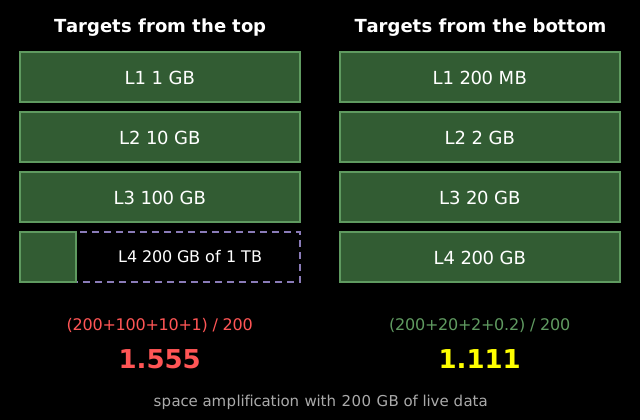
Now about 90% of the data sits in the last level, so the levels above add only about 11%, and the targets grow with the data, with no retuning. In the team’s benchmark, “Dynamic Leveled Compaction limits space overhead to 13%, while Leveled Compaction can add more than 25%”, with a worst case “as high as 90%”. It is on by default in the current source. The 11% is the arithmetic, the 13% the measurement.
Space is also why Facebook put RocksDB under MySQL as MyRocks: “50 percent less storage for the same amount of data compared with compressed InnoDB”.
Three generations of filters
Compaction decides how much gets written. Filters decide how much gets read. A Bloom filter is the bouncer at the door of each sorted run, a small in-memory structure that says “definitely not here” so the read can skip the file, and RocksDB has rebuilt that bouncer three times, per its Bloom filter wiki.
- One filter per block. The first generation came from LevelDB: one small filter for every 2 KB of data. The catch: even when the filter says no, “the index is already loaded and looked into.”
- One filter per file. “The new format, full filter, addresses these issues by creating one filter for the entire SST file.” The check now happens before any index lookup, which the paper lists among its early CPU savings.
- Ribbon. Available since version 6.15.0 as a drop-in replacement.
The floor
A Bloom filter switches on a few bits per key, and a single zero at lookup means the key was never added. A filter with a 1% false positive rate needs at least log2(100), about 6.6 bits per key (Carter et al., STOC 1978). A standard Bloom filter needs 1.44 times that, about 9.6 bits. RocksDB’s cache-local Bloom filter needs a bit more: the wiki gives 9.9 bits per key at 1%.
Ribbon: each key is an equation
Ribbon, by Peter Dillinger and Stefan Walzer, also hashes each key to positions, but it does not switch them on. Those positions must combine, by XOR, to a short fingerprint of the key. So each key becomes an equation, and building the filter solves all the equations at once and stores only the solution. In RocksDB’s source that is a linear system over GF(2) solved with on-the-fly Gaussian elimination.
In Bloom, keys only add ones, so to keep chance matches rare about half the bits must stay zero. In Ribbon the solver picks every bit, so each one does useful work. A lookup recomputes its one equation, and a key that was never added matches only by chance. The wiki says a Ribbon policy tuned to the same 1% rate “only uses around 7 bits per key”, close to the floor. The paper says Ribbon can bring the overhead over that floor below 10%, “with some additional CPU time”.
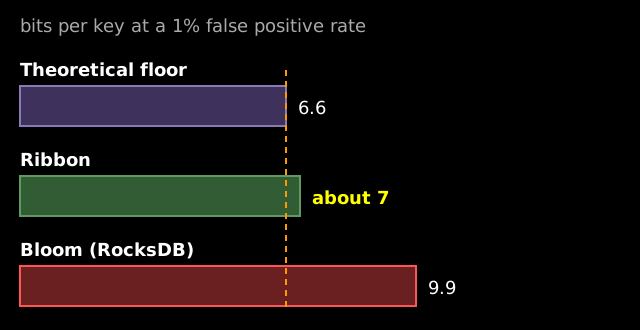
Meta’s announcement says Ribbon filters “save roughly 1/3 of memory compared with Bloom filters”, which it expects to add up to several percent of RAM at Facebook’s scale.
Paid in CPU, so pick by lifetime
The price is the solving. The wiki says Ribbon uses “about 3-4x as much CPU on filters”, and “most of the additional CPU time is in the background jobs constructing the filters.” So the Ribbon policy mixes the two: by default (filter_policy.h) it builds Bloom filters for newly flushed files, which compaction soon replaces, and Ribbon for the longer-lived levels below. A filter built once and read for a long time is worth the extra CPU.
The SQLite of storage engines
What is the most widely deployed database in the world? Not Oracle, not Postgres. SQLite calls itself the most widely deployed database engine, found in every Android device, every iPhone, and every Firefox, Chrome and Safari browser. RocksDB took the same niche one layer down: the paper describes it as “designed as a library component that is embedded in higher-level applications”.
Inside Facebook it grew fast: ZippyDB was first deployed in 2013, then came MyRocks, and by 2021 the paper counts “over 30 different applications, in aggregate storing many hundreds of petabytes of production data”.
Outside, PingCAP built TiKV on it “because RocksDB is mature and high-performance”. YugabyteDB, founded by three former Facebook engineers, builds its storage layer on “a highly customized and optimized version of RocksDB” with one instance per tablet. The repository’s users file lists LinkedIn, Netflix, Kafka Streams, Flink, and FoundationDB, which puts RocksDB inside Apple and Snowflake.
That is the sense in which RocksDB became the SQLite of storage engines (our framing, not a quote): almost nobody installs it directly. You install a database, a stream processor or a queue, and RocksDB comes along underneath.
When to pick it, and how to look inside
RocksDB fits when you need an embedded engine on local flash and can measure your workload, or inherit settings someone already tuned. It fits worse when object storage is the source of truth (see databases on object storage), or when a language boundary sits on your hot path (why CockroachDB replaced RocksDB).
To see it yourself, build the repository and run db_bench, its benchmark tool. The LOG file’s compaction stats print a “Write Stall (count)” line with a counter per cause. For numbers across releases, Mark Callaghan, whom the paper thanks as “the mentor to the project for years”, benchmarks RocksDB version after version on his blog, Small Datum.
What RocksDB really is
An LSM tree buffers writes in memory, flushes sorted runs to disk and compacts them in the background. RocksDB is what that last step becomes when it has to keep up with a server: more threads, three gauges, and a knob for every cost. A library that fits everyone asks everyone to tune it, and for the team building CockroachDB that price got too high, as the story of why CockroachDB replaced RocksDB shows.
Sources and further reading
Sources
- RocksDB, Initial checkin. (f67e15e), 2011
- Google, LevelDB
- RocksDB, Print log message when we are throttling writes. (338939e), 2012
- RocksDB, The mega-patch, multi-threaded compaction (1ca0584), 2012
- Dong et al., Evolution of Development Priorities in Key-value Stores Serving Large-scale Applications: The RocksDB Experience, FAST ’21
- Dean and Ghemawat, LevelDB: A Fast Persistent Key-Value Store, 2011
- Cockroach Labs, Pebble: a RocksDB-inspired key-value store written in Go
- Facebook Engineering, Under the Hood: Building and open-sourcing RocksDB, 2013
- RocksDB Wiki, Write Stalls
- LevelDB source: db/dbformat.h, table/filter_block.cc
- Dhruba Borthakur, The History of RocksDB, 2013
- RocksDB Wiki, Options File
- RocksDB Wiki, Tuning Guide
- facebook/rocksdb source, advanced_options.h, column_family.cc
- RocksDB Wiki, Universal Compaction
- Matsunobu, MyRocks: A space- and write-optimized MySQL database, 2016
- RocksDB Wiki, Bloom Filter
- Dillinger and Walzer, Ribbon filter: practically smaller than Bloom and Xor, 2021
- Dillinger, Ribbon filter: Practically smaller than Bloom and Xor, Meta Engineering, 2021
- SQLite, Most Widely Deployed and Used Database Engine
- Masti, ZippyDB, Meta Engineering, 2021
- TiKV, RocksDB in TiKV
- RocksDB, USERS.md
- YugabyteDB, DocDB architecture
- YugabyteDB, About
- Mark Callaghan, Small Datum
- RocksDB Wiki, Column Families
- PingCAP, RocksDB overview
- tikv/tikv
- cockroachdb/pebble
- Dong, Dynamic Level Size for Level-Based Compaction, 2015
- RocksDB Wiki, Leveled Compaction
- Carter, Floyd, Gill, Markowsky, Wegman, Exact and approximate membership testers, STOC 1978
- Our own counts from local clones: lines of code, and data members of the public option structs
Further reading
- RocksDB, ribbon_alg.h, the header that documents the Ribbon construction
- RocksDB, filter_policy.h, including
bloom_before_level - RocksDB, db_bench and internal_stats.cc
- Related: what is an LSM tree, the RUM conjecture, object storage for databases, why CockroachDB replaced RocksDB with Pebble